进程和线程
2025年6月3日
16:37
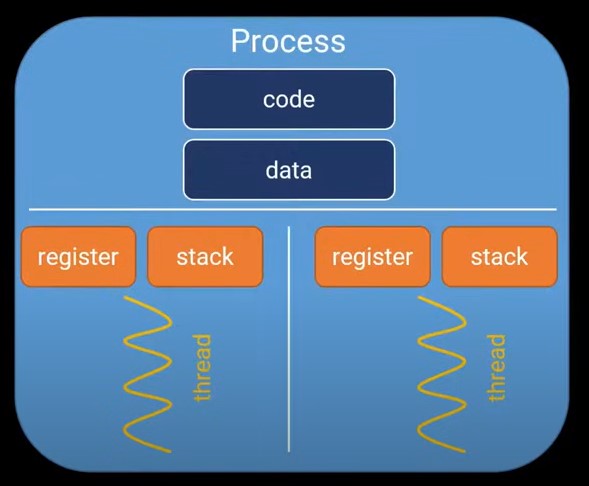
一个进程包含code, data, register,stack等部分,进程之间是独立的,不共享这些参数,一个进程可能包含多个线程,线程之间是共享code和data的,但不共享register,stack。
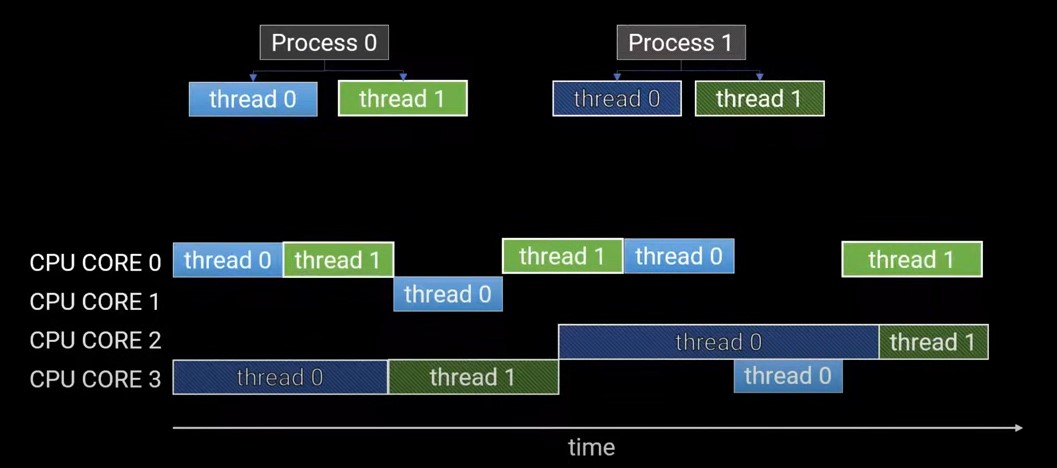
假设进程0和进程1各有两个线程,可以看到,同一个进程的两个线程无法同时执行。所以线程是cocurrent共存的,但不是parrallel并行的。而且还可以看出,线程和进程可以在不同的CPU上切换。
在python中,一个进程下只有一个线程在运行,可以保证线程安全,并且可以提高线程效率。
线程的切换(在哪个CPU core上执行,执行thread0还是thread1)是由CPython 决定的,Cpython will consider switching threads every 15ms or when an I/O operation is encountered.
进程的切换(在哪个CPU core上执行)取决于os。
大多数的python库如numpy,scipy,tensorflow底层已经进行了多线程优化,不需要我们再去实现。
Multi-processing (多處理程序/多進程):
資料在彼此間傳遞變得更加複雜及花時間,因為一個 process 在作業系統的管理下是無法去存取別的 process 的 memory
適合需要 CPU 密集
Multi-threading (多執行緒/多線程):
資料彼此傳遞簡單,因為多執行緒的 memory 之間是共用的,但也因此要避免會有 Race Condition 問題
適合需要 I/O 密集,像是爬蟲需要時間等待 request 回覆
Multithreading in Python
Step 1: Import Module
import threading
Step 2: Create a Thread
To create a new thread, we create an object of the Thread class. It takes the 'target' and 'args' as the parameters. The target is the function to be executed by the thread whereas the args is the arguments to be passed to the target function.
t1 = threading.Thread(target, args)
t2 = threading.Thread(target, args)
Step 3: Start a Thread
To start a thread, we use the start() method of the Thread class.
t1.start()
t2.start()
Step 4: End the thread Execution
线程start之后,主线程的代码会继续执行,如果要等待子线程执行完毕后再执行后续代码,需要用.join()
Once the threads start, the current program (you can think of it like a main thread) also keeps on executing. In order to stop the execution of the current program until a thread is complete, we use the join() method.
t1.join()
t2.join()
As a result, the current program will first wait for the completion of t1 and then t2 . Once, they are finished, the remaining statements of the current program are executed.
import threading
import time
def main(url, num):
print('開始執行', url)
time.sleep(2)
print('結束', num)
url_list1 = ['www.yahoo.com.tw, www.google.com']
url_list2 = ['www.yahoo.com.tw, www.google.com']
url_list3 = ['www.yahoo.com.tw, www.google.com']
# 定義線程
t_list = []
t1 = threading.Thread(target=main, args=(url_list1, 1))
t_list.append(t1)
t2 = threading.Thread(target=main, args=(url_list2, 2))
t_list.append(t2)
t3 = threading.Thread(target=main, args=(url_list3, 3))
t_list.append(t3)
# 開始工作
for t in t_list:
t.start()
# 調整多程順序
for t in t_list:
t.join()
Multi-processing in Python
import multiprocessing as mp
import time
def main(url, num):
print('開始執行', url)
time.sleep(2)
print('結束', num)
url_list1 = ['www.yahoo.com.tw, www.google.com']
url_list2 = ['www.yahoo.com.tw, www.google.com']
url_list3 = ['www.yahoo.com.tw, www.google.com']
# 定義線程
p_list = []
p1 = mp.Process(target=main, args=(url_list1, 2))
p_list.append(p1)
p2 = mp.Process(target=main, args=(url_list2, 2))
p_list.append(p2)
p3 = mp.Process(target=main, args=(url_list3, 2))
p_list.append(p3)
# 開始工作
for p in p_list:
p.start()
# 調整多程順序
for p in p_list:
p.join()
multiprocessing.pool.Pool这个包中的功能要求子进程可以导入 __main__ 模块。虽然这在 编程指导 中有描述,但还是需要提前说明一下。这意味着一些示例在交互式解释器中不起作用。
multiprocessing 支持进程之间的两种通信通道:队列Queue和管道Pipe。
使用多进程时,一般使用消息机制实现进程间通信,尽可能避免使用同步原语,例如锁。
消息机制包含: Pipe() (可以用于在两个进程间传递消息),以及队列(能够在多个生产者和消费者之间通信)。
与其他 Python 队列实现的区别之一,在于 multiprocessing 队列会使用 pickle 来序列化所有被放入的对象。 由获取方法所返回的对象是重新创建的对象,它不会与原始对象共享内存。
备注
当一个对象被放入一个队列中时,这个对象首先会被一个后台线程用 pickle 序列化,并将序列化后的数据通过一个底层管道的管道传递到队列中。 这种做法会有点让人惊讶,但一般不会出现什么问题。 如果它们确实妨碍了你,你可以使用一个由管理器 manager 创建的队列替换它。
- 将一个对象放入一个空队列后,可能需要极小的延迟,队列的方法 empty() 才会返回 False 。而 get_nowait() 可以不抛出 queue.Empty 直接返回。
- 如果有多个进程同时将对象放入队列,那么在队列的另一端接受到的对象可能是无序的。但是由同一个进程放入的多个对象的顺序在另一端输出时总是一样的。